
EP11: Learning System Design | URL Shortener | Part 3 Database Engineering
Building a scalable DynamoDB schema and preventing race conditions in a distributed system.

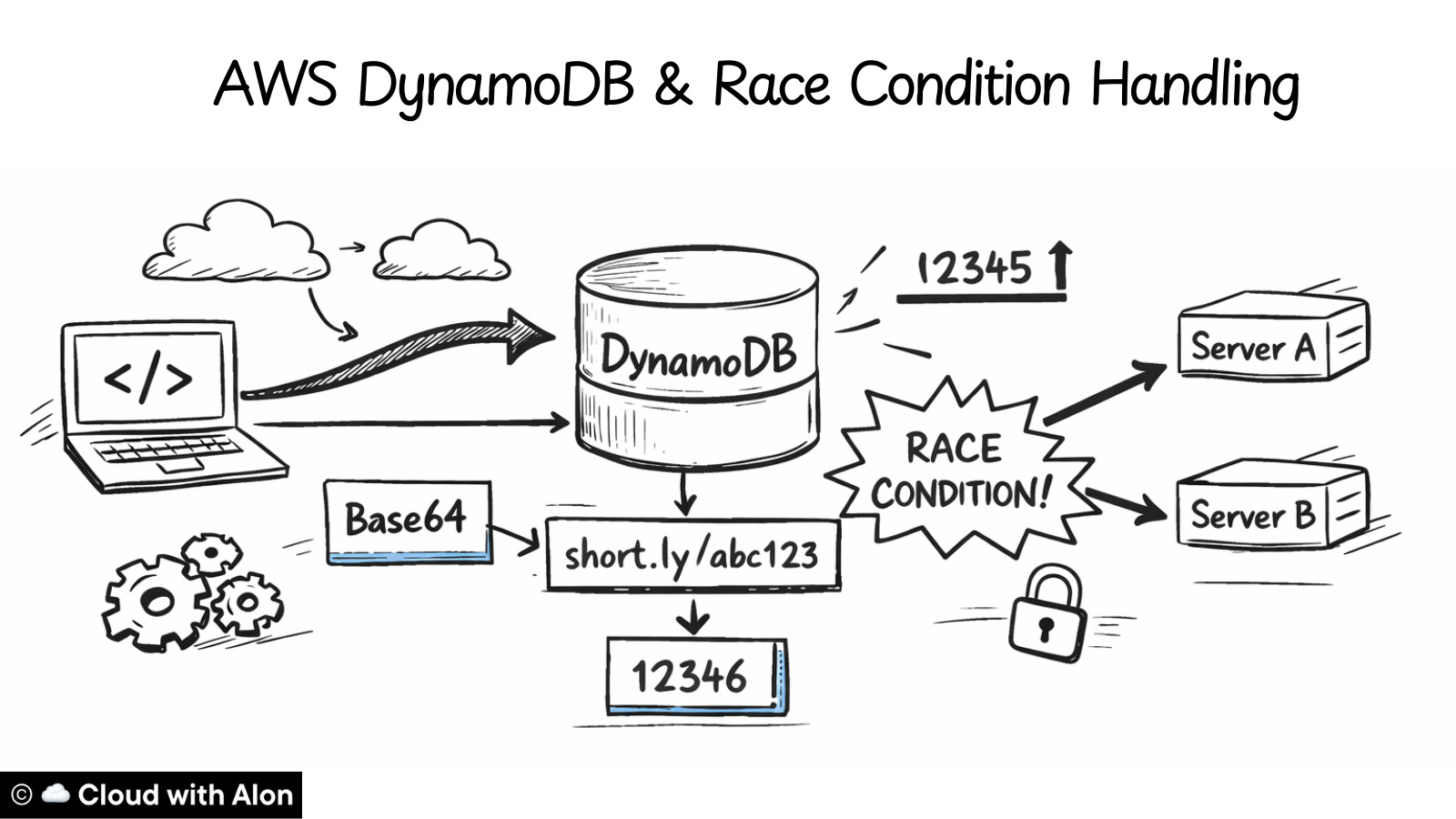
Howdy friends,
Time for part 3.
In part 2 of learning system design using a URL shortener application, I showed how I engineered a short URL application that could scale to billions of users.
In this episode, I will focus on the database side.
The first question was which database to choose.
For a URL shortener, the access pattern is simple: a short URL maps → to a long URL.
Therefore, I didn’t need relational features like joins or complex relationships, so a key-value database felt like a natural fit.
I chose DynamoDB because it’s a managed service and can handle simple lookups at massive scale.
Next came the schema.
Our application supports both auto-generated URLs and custom URLs. At first, I thought about using two separate tables, but a single table works fine because every URL has a unique short ID.
DynamoDB gives a partition key and a sort key. Since each short URL ID is unique, a partition key is enough for now. If a short URL could map to multiple values, we need sort key as well.
Here’s what the table looks like:
Table: url_mappings
Partition Key: short_code (string)
{
  “short_code”: “abc123”,
  “original_url”: “https://google.com”,
  “created_at”: “2024-01-15T10:30:45Z”,
  “is_custom”: false,
  “user_id”: “user_123”
}
We also keep a counter row in the same table
{
  “short_code”: “counter_number”,
  “counter_value”: 123
}
The main table stores URL metadata. We will have other tables for client information and additional metadata.
The counter row is important because we generate short URLs using a counter increment + Base64 encoding. The application needs this counter to create new URLs, so storing it in the same table works for now.
For now, the DynamoDB table is configured as:
Writes: 35/sec → Provision 50 WCU (with buffer)
Reads: 350/sec → Provision 400 RCU (with buffer)
Alternative: On-Demand mode for unpredictable traffic
The table is currently configured for read-heavy traffic. In the future, we might need more write capacity, since writes for URLs and the counter happen in the same table, which could limit scaling.
To handle this, we can move the counter to its own table and split the URL mappings across multiple tables. This can be done easily as the system grows.
The main goal in designing this application is to start small but make it easy to scale. Keeping the schema simple now allows growth without major changes later.
Now we have a single-table database, but the application will be running distributed for high availability, with at least two servers from the start. Once the application is distributed, some issues can appear, and the main one is race conditions.
A race condition happens when multiple requests try to update the same value in the database at the same time. In our case, the value is the “counter_number”.
If two servers read the same counter and generate a URL simultaneously, they could create duplicates, which would break the application.
Example:
Server A gets counter: 12345 → converts to “dnh” [short url id]
Server B gets counter: 12345 → converts to “dnh” [short url id]

Both try to write “dnh” → COLLISION!
To prevent this, we use a kind of auto-increment logic in DynamoDB. Unlike MySQL, DynamoDB does not have built-in auto-increment, but we can achieve the same effect using the “update_item” operation with “ADD” expression:
response = dynamodb.update_item(
        TableName='url_mappings',
        Key={'short_code': {'S': 'counter_number'}},
        UpdateExpression='ADD counter_value :inc',  # DynamoDB: read + increment + store
        ExpressionAttributeValues={':inc': {'N': '1'}},
        ReturnValues='UPDATED_NEW'  # Return the new incremented value
    )
This will auto-increment the counter_number for each new URL.
Even though DynamoDB is a NoSQL database, it supports atomic operations. This means when a write request hits an item, DynamoDB locks it, performs the operation, and only unlocks it if the operation succeeds or fails. Essentially, it’s all-or-nothing.
So even if multiple requests happen at the same time, they are executed sequentially under the hood:
Example:
Time: 10:00:00.001 - Server A calls ADD
Time: 10:00:00.001 - Server B calls ADD (same millisecond!)

Server A: LOCK → increment 123→124 → UNLOCK → returns 124
Server B: WAIT for lock → LOCK → increment 124→125 → UNLOCK → returns 125
From the outside, it looks like the requests happened concurrently, but each server receives a unique counter value, avoiding collisions.
Concurrent Requests:
Time T1: Server A calls atomic ADD → DynamoDB returns: 124
Time T1: Server B calls atomic ADD → DynamoDB returns: 125
Time T1: Server C calls atomic ADD → DynamoDB returns: 126

All servers get DIFFERENT numbers!
All servers get different numbers, keeping the system consistent even under concurrent access.
With this, we have covered the major database design decisions for the system.
Next, we will move to the API design and discuss how the application will expose endpoints for creating and resolving short URLs in the next episode.
Till then, happy learning.
Growing into a better cloud architect every day,
Alon